Release Notes
Comprehensive guides and release timeline for the Learnr platform
Current Version:
v1.2.02026-02-23
6 changes
P5.js Simulation Component
Introducing the P5.js component for the Learnr Rendering Machine! Content creators can now write and embed interactive P5.js simulations directly within their projects, enabling rich, code-driven visual and physics simulations without leaving the platform.
Static Pages for SEO
Classrooms and their projects now have dedicated static pages optimized for search engine indexing. This allows educators to market their content through Google searches, making it easier for prospective students to discover classrooms and learning materials organically.
Help & Documentation
The Help & Documentation experience has been significantly improved. A guided tour functionality now walks users through key platform features interactively, and a new detailed documentation page provides in-depth guidance on feature usage — all accessible via the Help button at the bottom left of the screen.
Authentication
Fixed an issue where standard email/password sign-up was failing due to a null birthday field. New users can now register successfully using the normal sign-up flow
Classroom Content Versioning
Resolved a caching issue where switching to a different content version in a classroom would not reflect immediately.
General
Various small bugfixes and stability improvements.
2026-01-14
2 changes
Learnr Map
Learnr Map connects all flagship learnr classroom and topics into a single interactive map, allowing users to explore and discover relevant content easily. Users can search by subject or filter by difficulty level and organization to find the perfect learning path.
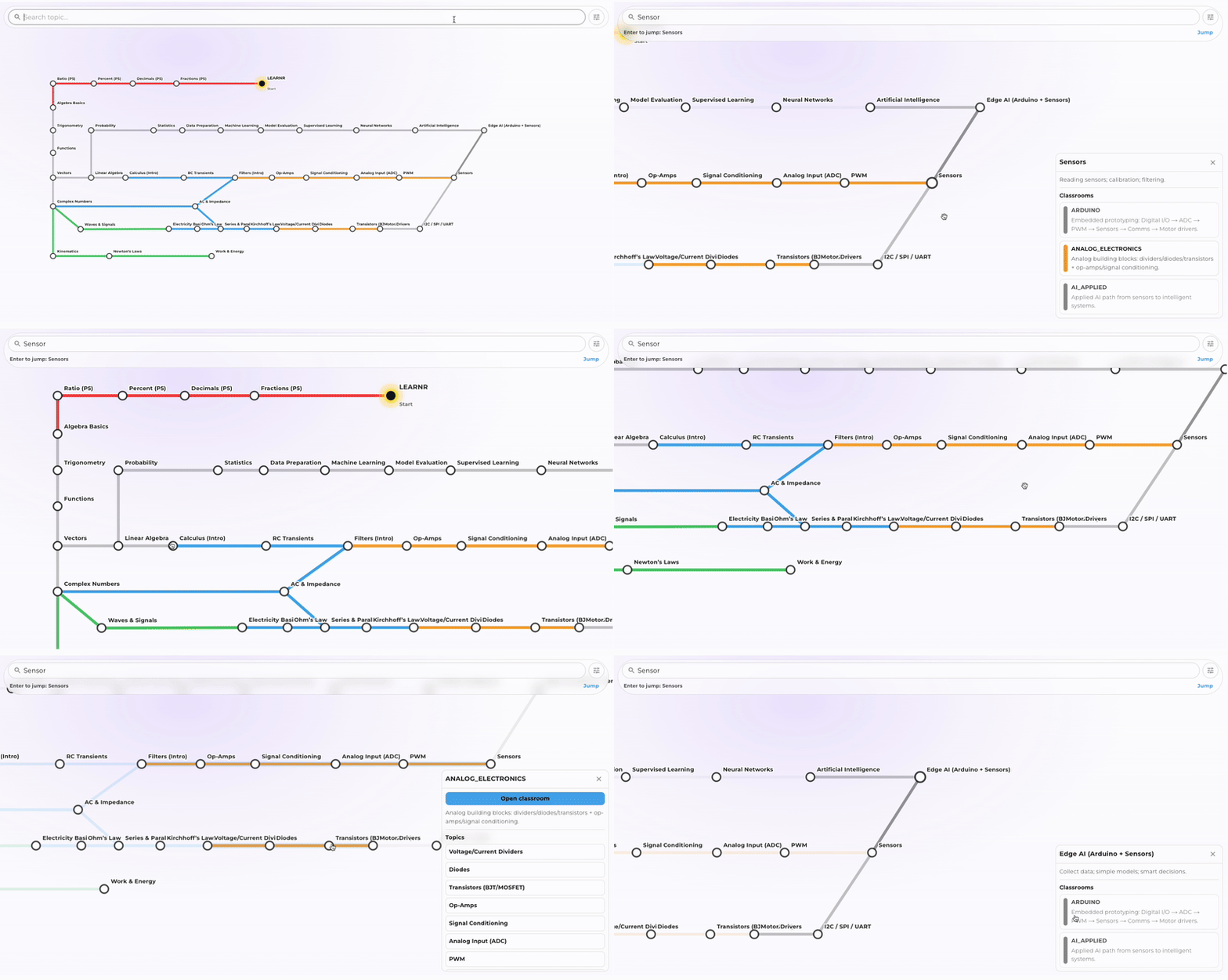
Learnr Map, showing all flagship learnr classrooms and topics in a single interactive map
Design Refresh
We refreshed the platform's design for a more consistent look and feel, improving intuitive interactions and overall user experience.
2026-01-03
3 changes
Classroom Monetization
Users with a connected Stripe account can now monetize classes and receive payments from students directly through the Learnr platform. To get started, go to your profile page under the Payments tab to connect Stripe. Then, create or edit a classroom in your organization, enable the monetization switch, and set the price. Certain projects will now be restricted to paid members accordingly.
Help Tutorial
A new visual step-by-step help tutorial is now available via the Help button at the bottom left of the screen. This guides users through setup and platform features interactively.
Design Refresh
We refreshed the platform's design for a more consistent look and feel, improving intuitive interactions and overall user experience.
2025-12-03
2 changes
Organization Project Creation UI/UX
We have updated the organization project creation interface to enhance user experience. The new design simplifies the process of creating and managing projects within your organization, making it more intuitive and efficient.
Project Discussion Forums and progress bar UI/UX
We’ve simplified the progress bar and refined the discussion forum UI/UX to improve interaction and engagement. Discussions now auto-refresh as you navigate between content blocks, so you’ll always see the latest comments without needing to manually reload the page.
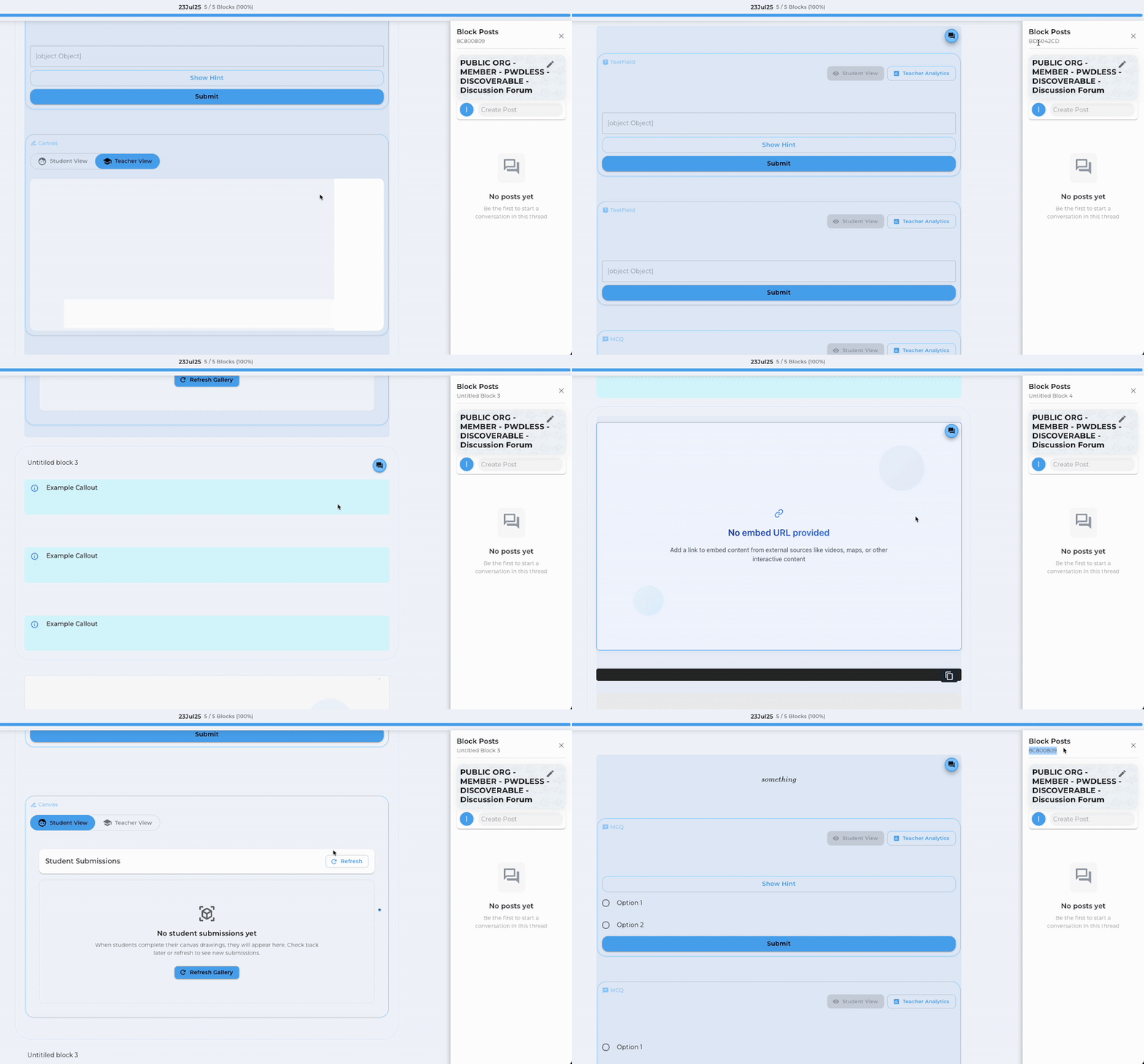
Discussion Forum Auto Track, showing automatic refresh of comments as users navigate through content blocks
2025-11-03
2 changes
Analytics Dashboard
We have updated the analytics dashboard to include more detailed insights on user interactions with interactive components. We have also moved the page to your classroom page, to make it more intuitive. You can also view the interactive component directly within the classroom analytics page for easy reference. In the retention tab, click on the dots to preview the block.
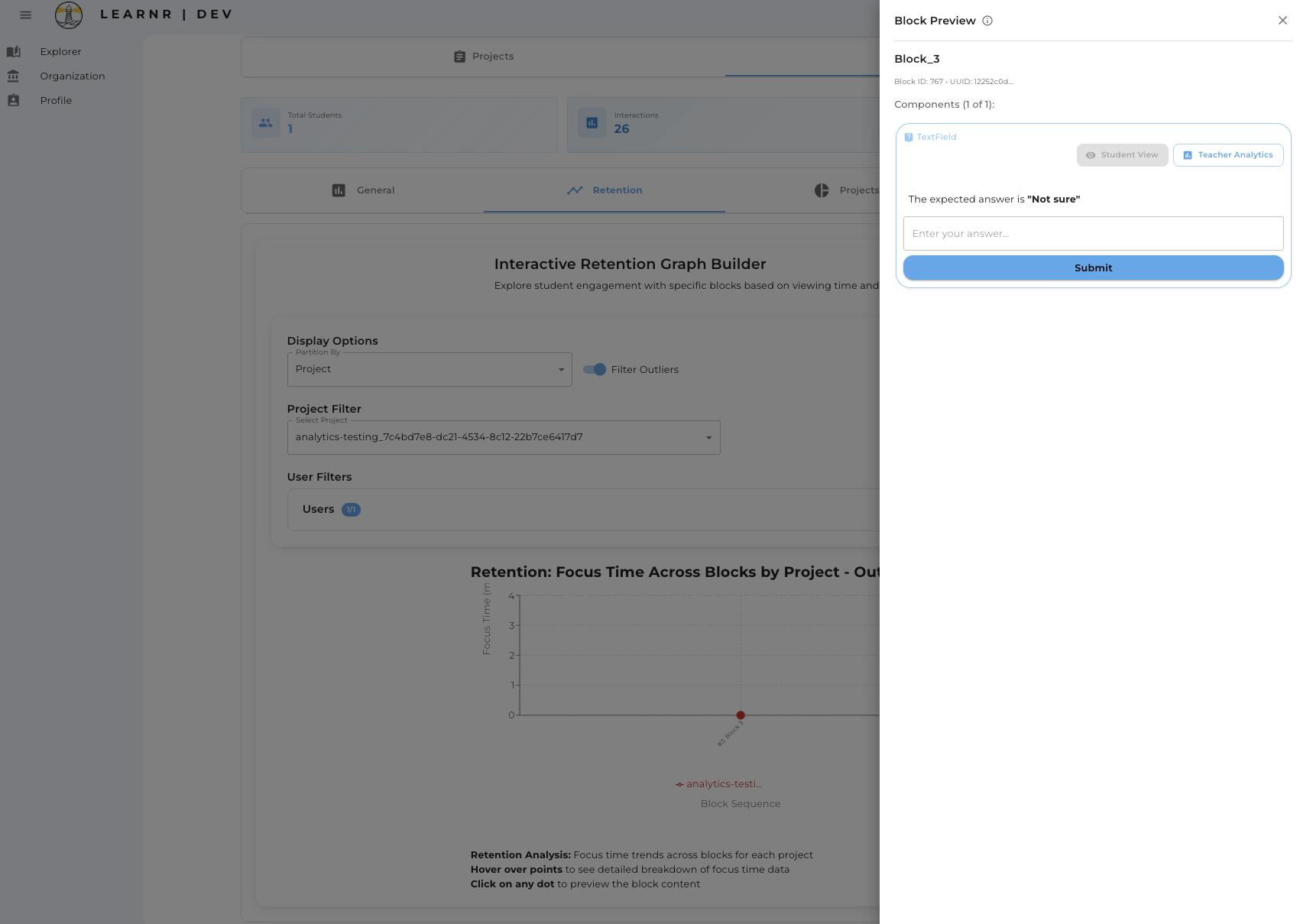
New Classroom Analytics Page with Interactive Component Preview, providing detailed insights on user interactions within the classroom context
Project Selection
Added pagination to the project selection dialog to improve performance when loading a large number of projects. The previous limit of 50 projects has been removed, as the list now supports pagination.
2025-10-09
3 changes
Form Validation
Fixed issue where compulsory question validation was not being checked when the button label changed from 'Continue' to 'Complete' in the last block.
Memory Management
Reduced high memory usage by optimizing the undo/redo stack implementation.
General
Various bugfixes and performance improvements for a smoother experience.
2025-09-28
1 change
Rendering Machine
Fixed issue where blocks could reorder unexpectedly when renaming them. Now, your block order stays exactly as you set it, even after renaming!
2025-09-25
7 changes
Version History Management
Version management is here! Check out your new version history dropdown where you can create new versions of your project!
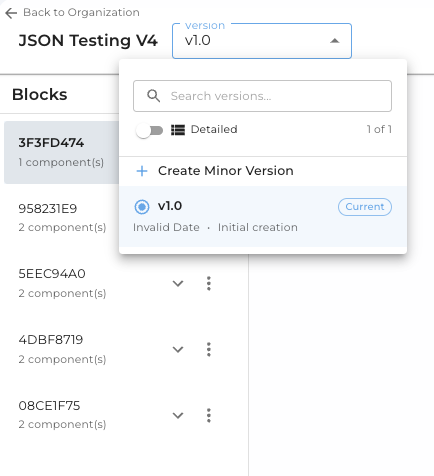
Version Dropdown in Project Settings, allowing users to manage different versions of their projects
Version Preview & Selection
Take control of your classroom projects! From your classroom settings, you can now choose to update your projects or switch to a different version that better fits your specific teaching needs. Perfect for adapting content for different classes or reverting to a version that worked better for your students!
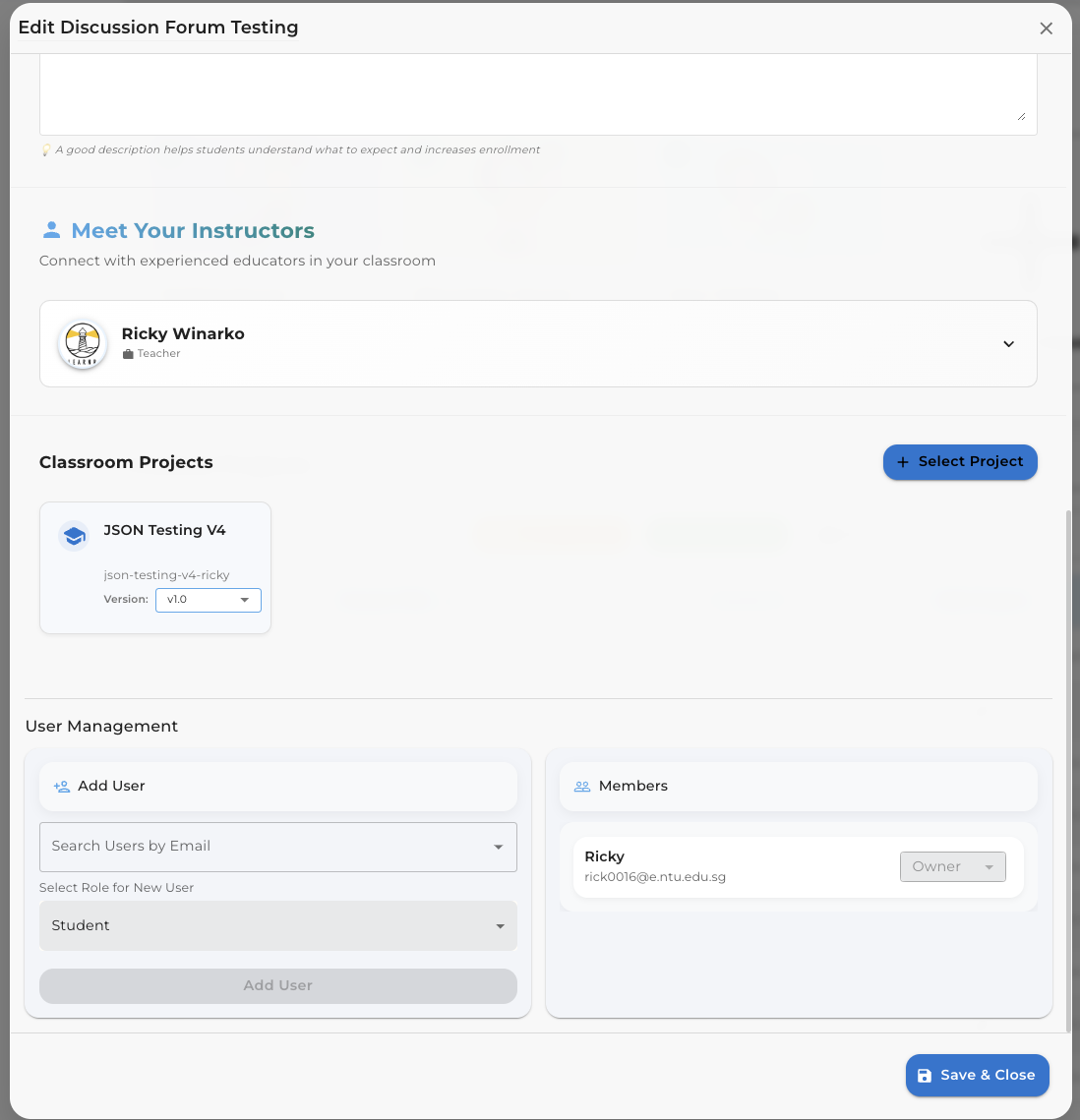
Version Selection in Classroom Settings, allowing teachers to choose specific project versions for their classrooms
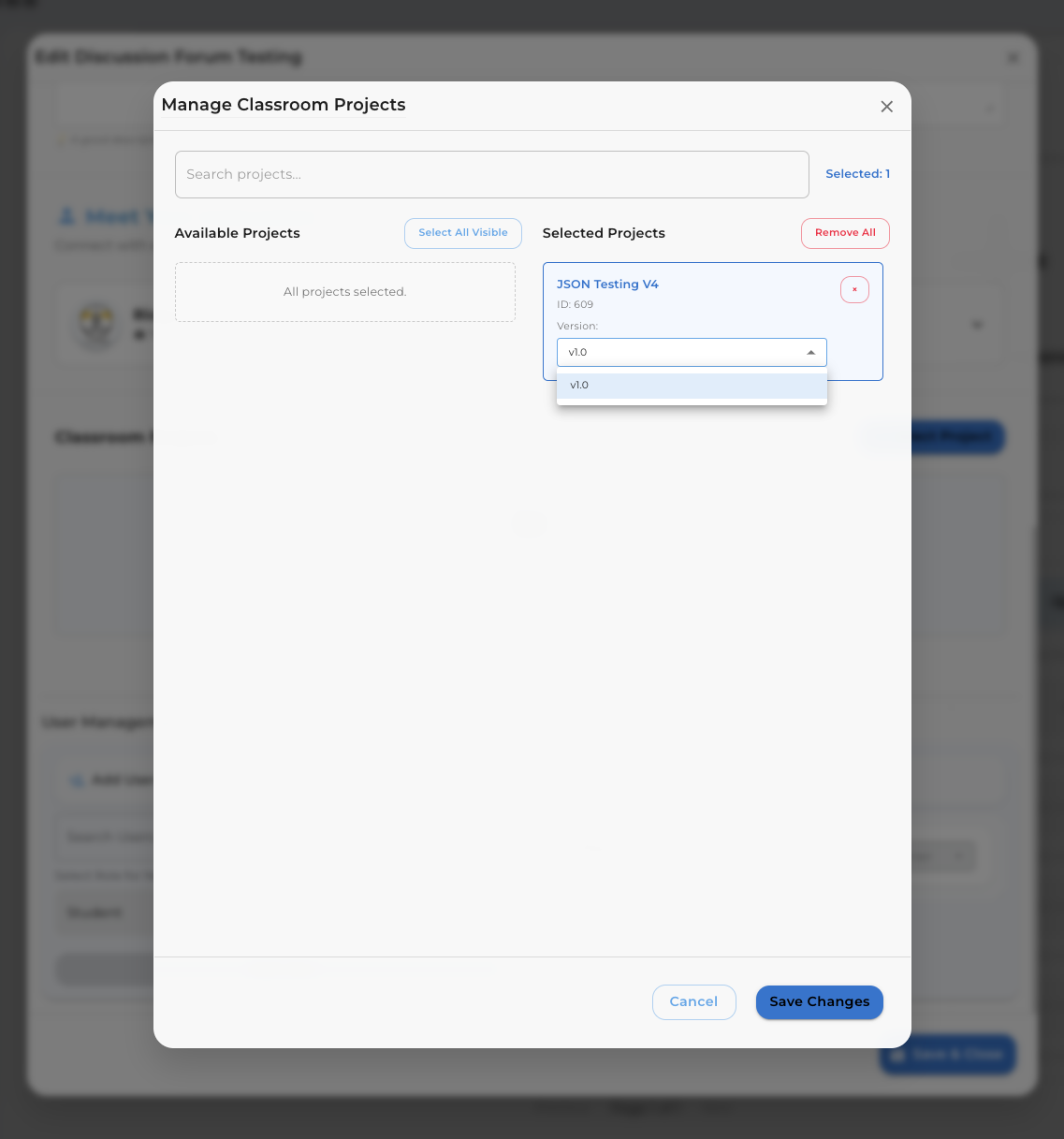
Version Selection when selecting projects for a classroom
Project Management Location
We've moved the Rendering Page to the Organization Page for easier access and better organization. Now, all your project management needs are centralized in one convenient location, making it simpler than ever to create, edit, and manage your projects within your organization.
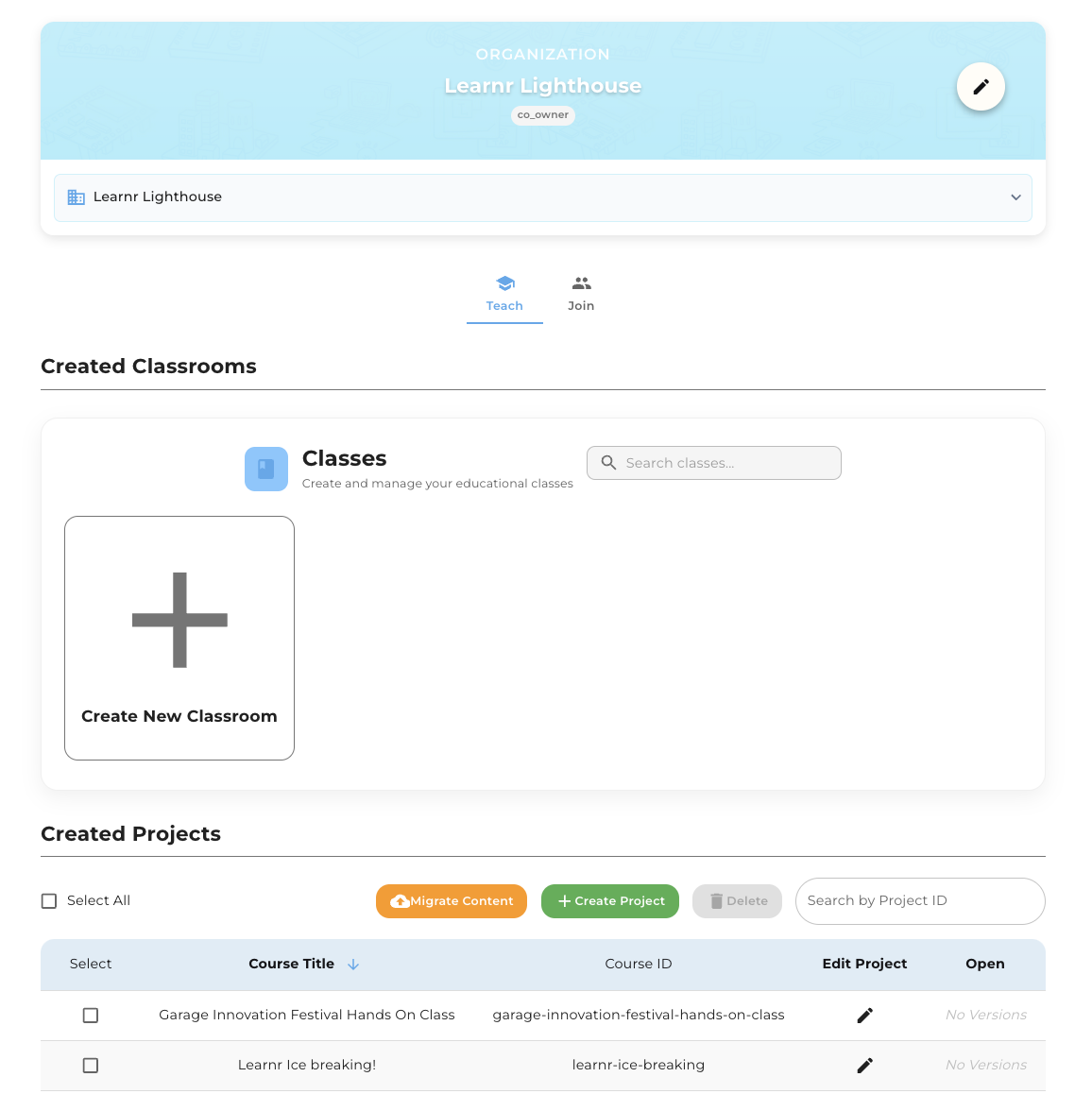
Created Projects in Organization Page, providing a centralized location for project management
Schema Validation
Say goodbye to confusing error messages! We've built a smart validation system that catches mistakes as you type and gives you helpful, clear feedback. Whether you forgot a title or mixed up data types, you'll know exactly what needs fixing before you save.
Component Architecture
We've organized everything like a well-arranged toolbox! Following clean design principles, we've sorted components into logical groups - from simple buttons to complex editor panels. Plus, we added detailed guides so developers can jump in and contribute with confidence.
Multiple Choice Questions (MCQ)
Multiple choice questions just got a gorgeous makeover! They now look crisp on every device, give you satisfying feedback when you make selections, and make it super easy to mark correct answers with simple toggle clicks. Much cleaner, much friendlier!
Canvas Interaction
Drawing and sketching is now buttery smooth across all your devices! We've fine-tuned the canvas to work consistently whether you're on mobile, tablet, or desktop, while also making it more efficient behind the scenes. Your creative flow just got a boost! ✨
2025-08-21
2 changes
MCQ LaTeX compatibility
Updated MCQ component to support LaTeX rendering for mathematical expressions, ensuring compatibility with LaTeX syntax in MCQs.
MCQ and Textfield Analytics Improvement
Updated MCQ and Textfield components to provide more detailed analytics, including user interactions and performance metrics. This enhancement allows for better tracking of user engagement with interactive components. (Wordcloud ☁️ view for textfield is also added)
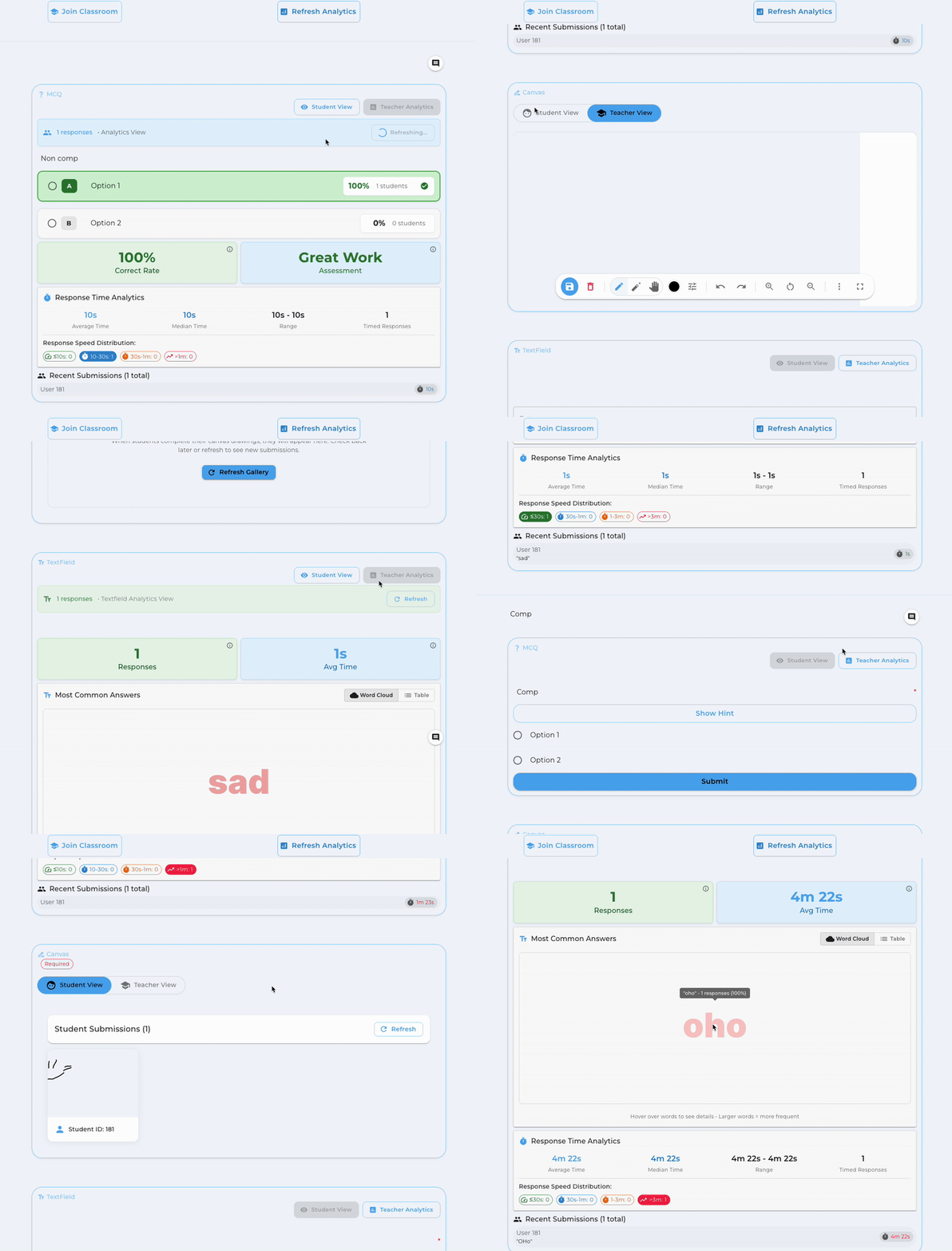
MCQ and Textfield Analytics Updates, providing more detailed analytics on user interactions and performance metrics
2025-08-07
2 changes
Backend Optimisation to JSON format
Enhances backend performance and stability by optimizing data handling in JSON format. This change is backend-only and does not affect the user interface. It is part of a broader infrastructure upgrade to support upcoming features and improvements.
Learnr Rendering Machine GUI improvement
Better user experience with improved GUI for the Learnr Rendering Machine, making it easier for content creators to manage and create content. This includes a more intuitive layout, enhanced navigation, and streamlined workflows.
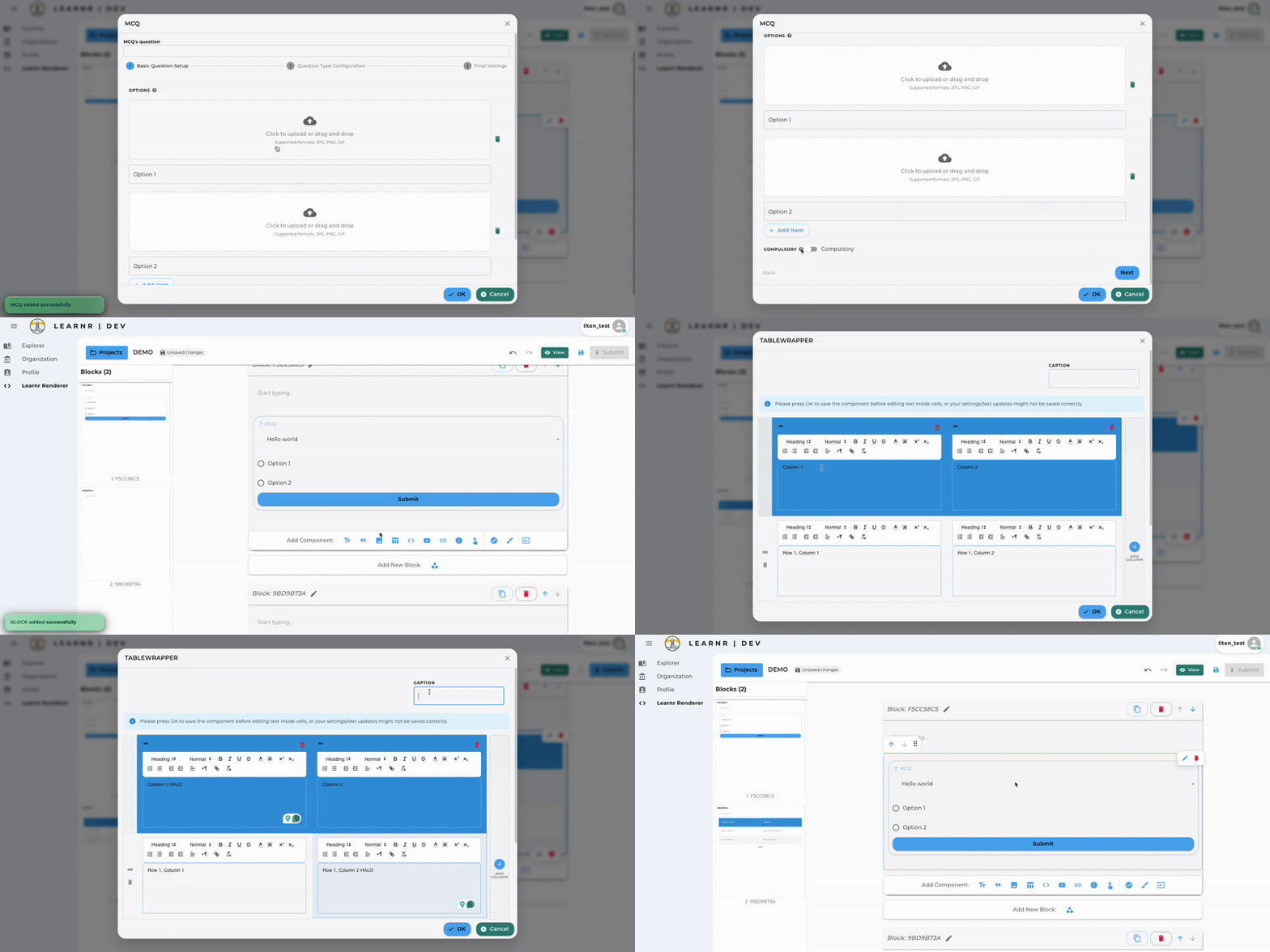
New rendering GUI for Learnr Rendering Machine, providing a more intuitive and user-friendly interface for content creators
2025-07-17
4 changes
Discussion Forum Archival
Enable archival of discussion forum content; when archived, new posts cannot be made, but existing posts can still be viewed and commented on
Backend Optimisation
Backend kubernetes architecture optimised for better performance and stability, no change in user experience
Password Reset Functionality
Fixed password reset functionality, ensuring users can reset their passwords without issues
Student Project UI/UX improvement
Fixed progress bar display issue caused by long project names
2025-07-13
2 changes
Teacher Canvas/Student Canvas/Annotations
Bug fix on canvas saving/undo logic, ensuring that canvas content is saved properly and undo functionality works as expected
Summary Analytics for Classroom and User
Temporily disabled summary analytics for classroom and user for performance optimisation, to be re-enabled in future updates
2025-07-03
5 changes
Classroom Configuration
Rename classroom activation to enable classroom for better clarity
Backend Optimisation
Backend optimisations for canvas to improve saving and loading performance, overcoming previous issues where canvas content was not saved properly
PDF watermark
Implemented watermark for PDF exports to enhance content security
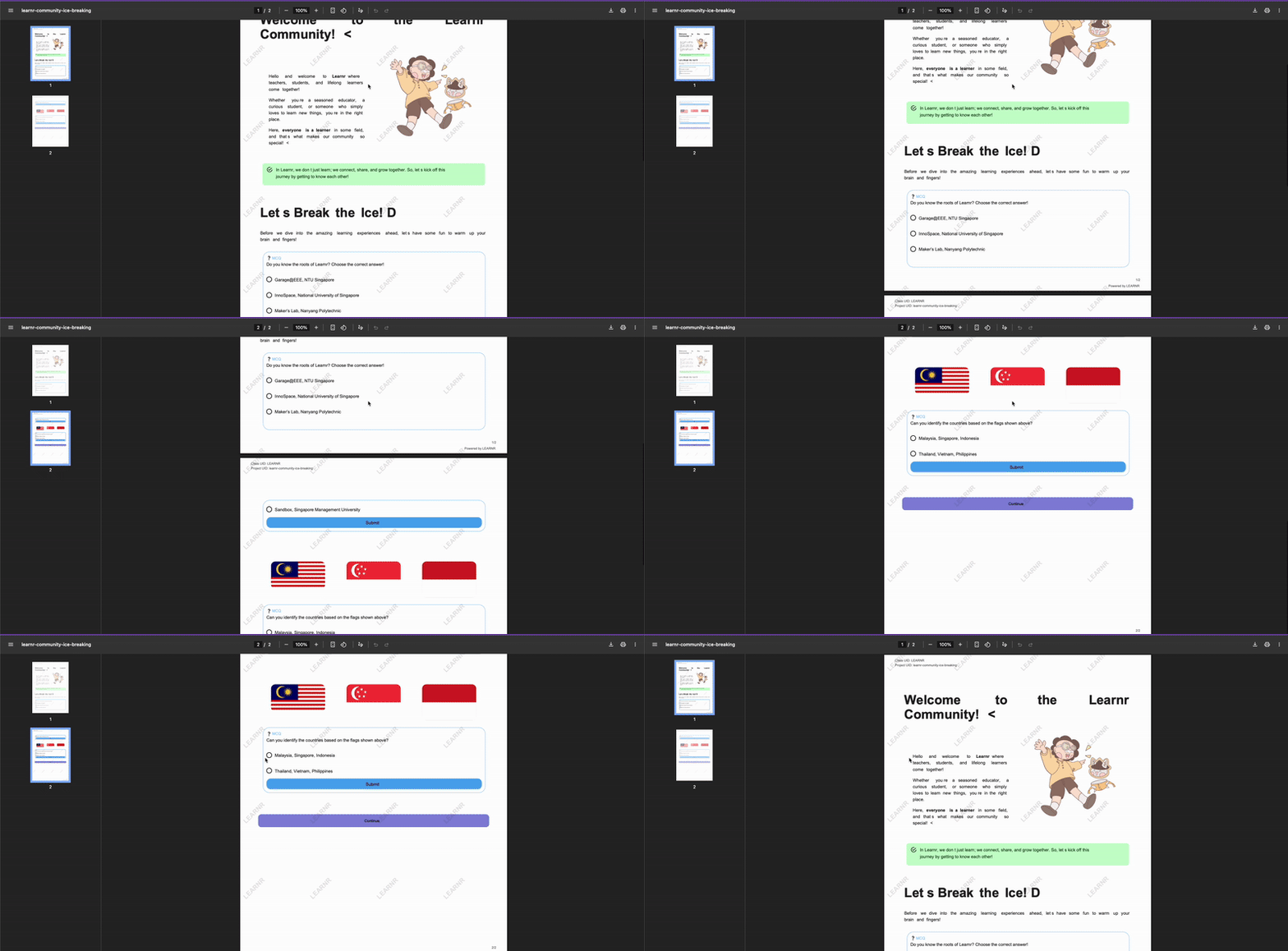
PDF watermark, default to LEARNR watermark
Student Canvas
Student canvas now supports copying teacher canvas content
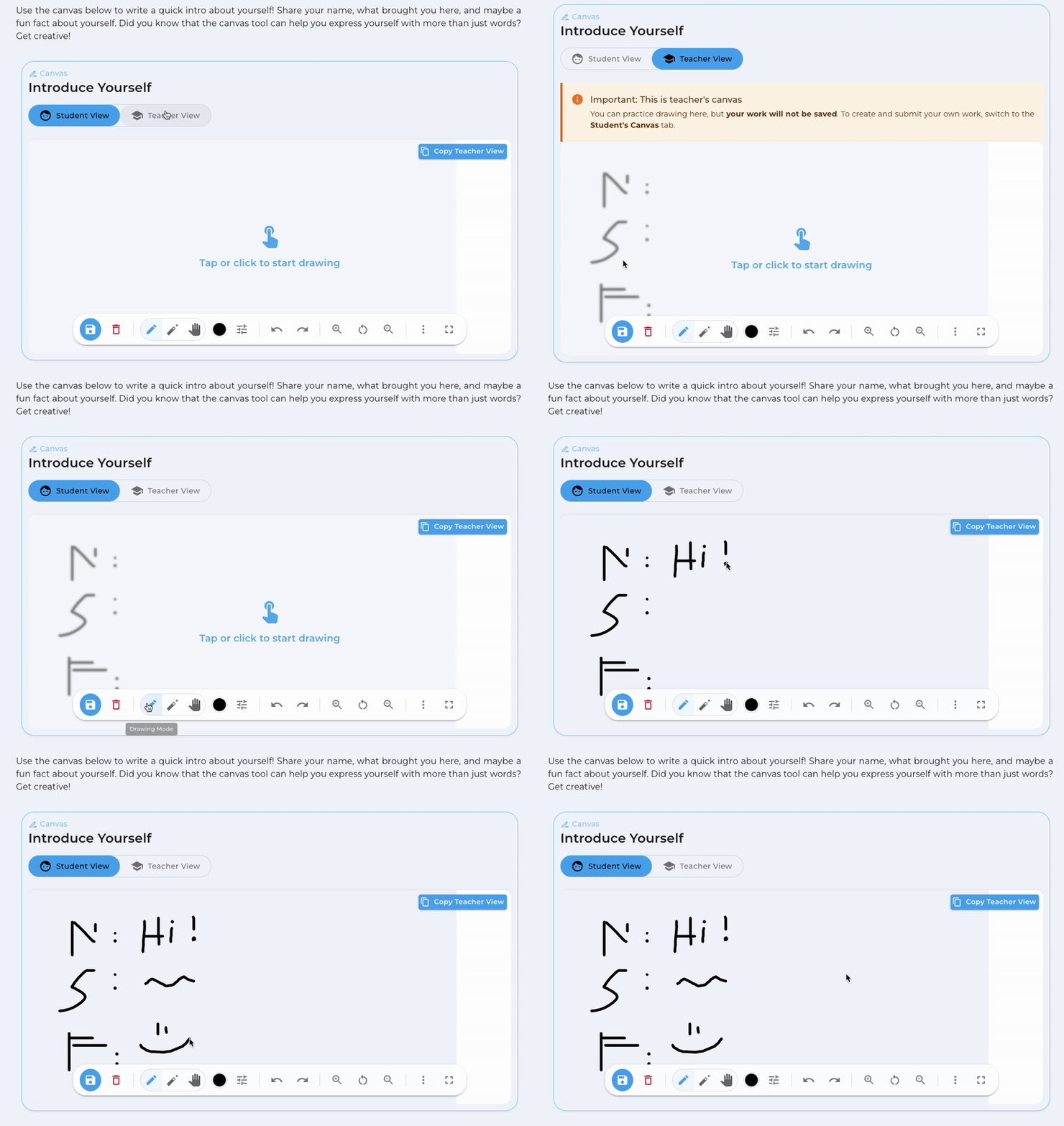
Student Canvas Copy Teacher View, allows students to copy teacher canvas content for reference
Main Content Sketch
Expand drawable area for main content sketch to improve usability
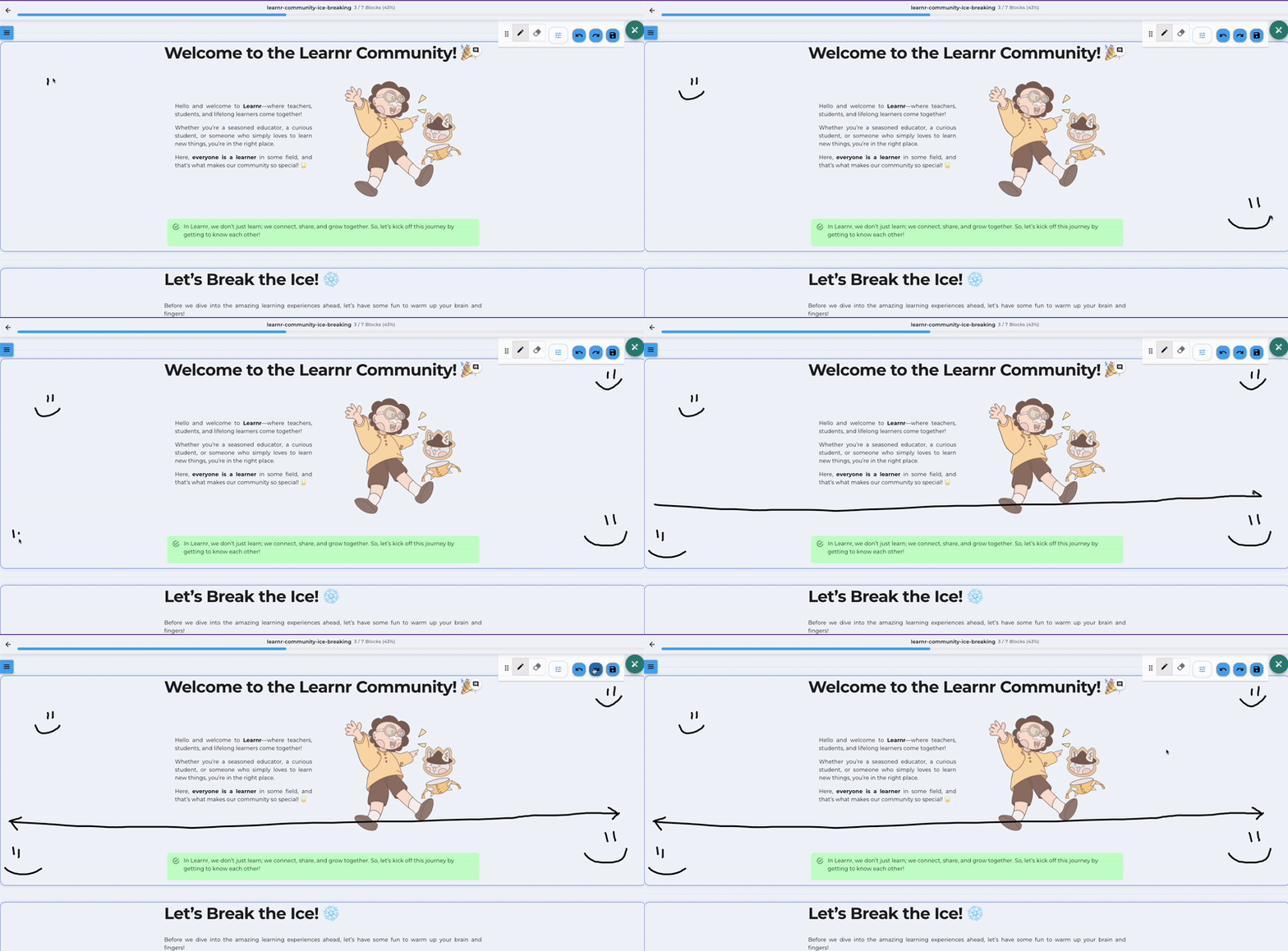
Expanded Sketch Canvas for Main Content, allowing more space for drawing and annotations
2025-07-01
1 change
Backend Optimisation
Optimise backend architercture for high signup/login traffic, no change in user experience
2025-06-20
5 changes
PDF Export
PDF re-enablement with template implementation including classID and projectID
Performance
Cache and saving optimization to prevent race conditions in saving procedure
Canvas
Fixed student compulsory canvas blocking issue
Classroom
QR code generation for classroom access
Input Validation
Input cleaning for MCQ and textfield hints/explanations to prevent crashes
2025-06-15
3 changes
Discussion Forum
Implemented discussion forum functionality
Analytics
Classroom summary analytics and personal analytics implemented
Polling
Poll functionality implemented for interactive sessions
2025-05-25
4 changes
Rendering Machine
Fixes on rendering machine GUI, reduced complexity
UI Components
Fixed callout and popup ordering sequences
Table Editor
Improved table editing functionality
Navigation
Enhanced goto and callout buttons with more options
2025-05-14
2 changes
Analytics
Full analytics for classroom implemented
Authentication
Google SSO (Single Sign-On) implemented
2025-02-12
5 changes
RBAC
Role-Based Access Control (RBAC) for organizations and classrooms
Component IDs
MCQ, textfield, and canvas IDs now automatically generated
Live Session
Deprecated Control the Flow, Raising hand, and Online status features
Rendering machine component
Deprecation of subblock component
PDF Export
PDF functionality temporarily disabled
2024-10-15
2 changes
Rendering Machine
First release of rendering machine GUI - no more markdown writing from creators!
User Experience
Major improvement on rendering machine GUI for content creators
2024-08-08
3 changes
Image Loading
Optimized image loading speed. Use 'CONVERT TO SPACES' button for existing content
Canvas
Fixed canvas ID issue affecting canvas saving. Use 'INSERT CANVAS ID' button for existing content
Content Naming
Standardized naming conventions: Rendered Content, Submitted Content, Classroom Content
2024-08-04
3 changes
Canvas
Save canvas drawings and use canvas in Learnr Classroom
HTML Integration
Create horizontal dividers, alternatives for comments and  , inline code blocks
Project Management
Relocated projects to Learnr Catalog, confirmed 960px screen width
2024-07-27
4 changes
PDF Export
Download Learnr Content as PDF (BETA)
Classroom
Live Session Feature: Pay Attention functionality
Project Creation
Resolved issue preventing new project creation
Analytics
Added PDPA notice for students joining classrooms
2024-07-22
3 changes
Classroom Features
Launched comprehensive classroom features including project submission, content creation, classroom management
Textfield Component
Textfield component introduced with support for hints, explanations
Live Session
Control the Flow, Raising hand, and Online status features
2024-07-15
3 changes
HTML Integration
Integration with HTML for lists, highlighting, coloring, font size, embedding, underlining, tabs, centering, and comments
Button Component
Button title now accepts only TEXT and is capitalized
Image Upload
Images appear in reverse chronological order with delete functionality
2024-07-05
4 changes
Code Block
Code Block feature introduced as beta
Rendering Block
Create Learnr rendering machine window within content
Layout
Subblocks display left to right and stack top to bottom on smaller windows
White Space
White space is now a stable feature
2024-06-14
4 changes
Markdown Editor
Added 'REINDENT LINES' button for better markdown readability
MCQ Component
MCQ blocks now require titles for proper functionality and analytics
Block Management
New blocks assigned random IDs, can be renamed for table of contents
Image Component
Image width can be set using pixels or ratio for responsive design
2024-05-20
5 changes
Navigation
Added 'goto' function for navigation between blocks within content
Rendering Machine
Default view changed to BOTH view instead of CODE view
MCQ Component
MCQ title no longer appears in reader view
Project Display
Project titles moved to top-left corner instead of content beginning
Component Naming
Invisible spacing renamed to whitespace
2024-04-23
1 change
Core Components
Released first set of basic components: block, subblock, callout, popup, image, mcq, canvas, table, invisible spacing
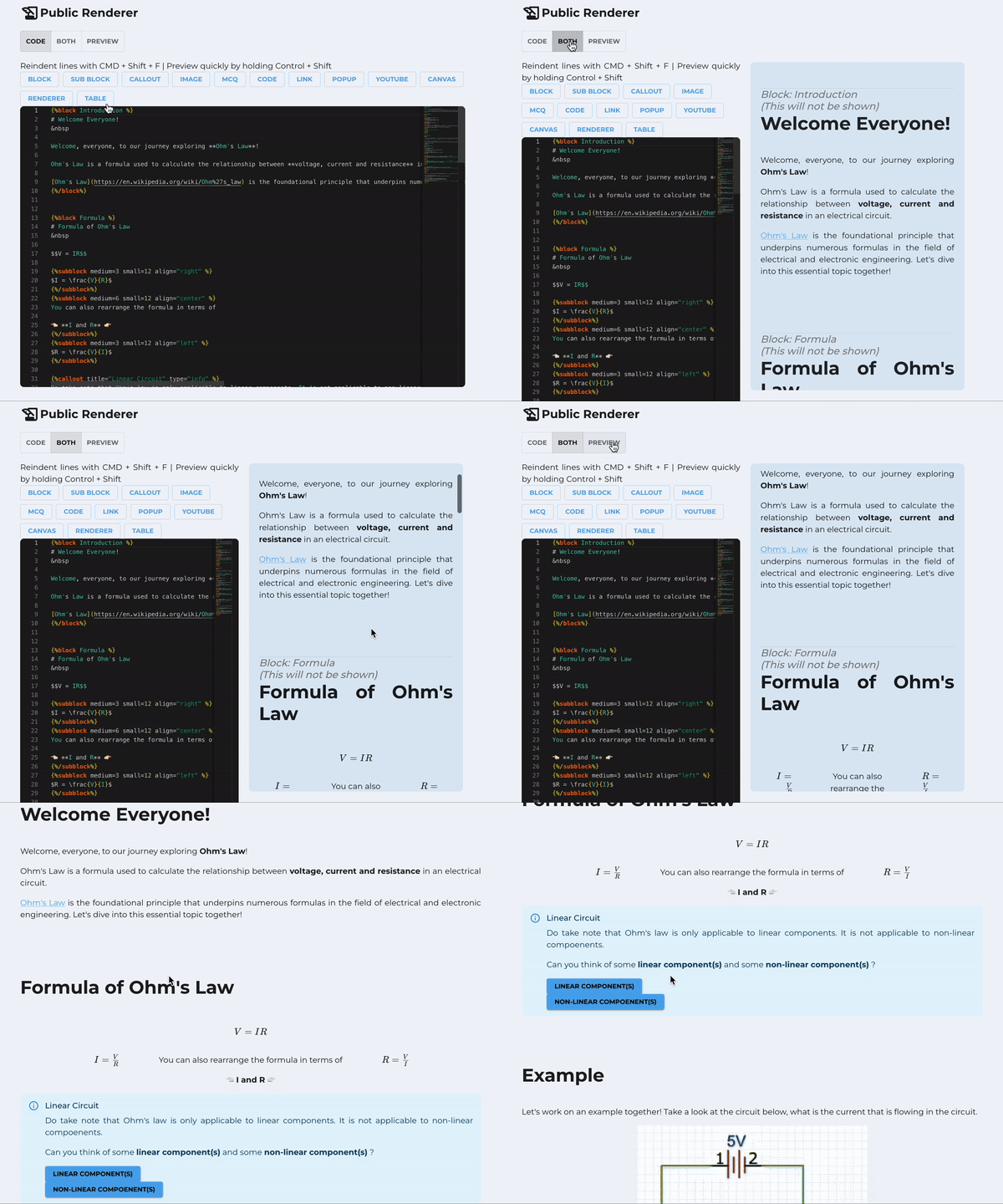
First Release of the Markdown based - Learnr Rendering Machine with basic components